An antidetect browser with automation means a workspace where profiles, proxies, scripts and APIs handle routine account actions. Teams use it to separate sessions, avoid repeating the same clicks by hand and launch dozens of profiles under control. Speed matters. But if IP, fingerprint, cookies, timezone and action limits are configured inconsistently, automation quickly starts doing damage.
Manual work with a large account pool breaks on small things. One profile starts without a proxy. Another has the wrong language. In the third one, an operator repeats a sharp click pattern because they are rushing. [Afina Browser](https://afina.io/en/blog/afina-automation-logic-guide?utm_source=binom) solves this as an antidetect environment where scenarios run inside isolated profiles and do not need to be rebuilt for every registration, status check, form or warm-up flow.
Let’s look at the stack without the marketing wrapper: where profile isolation matters, when a script is enough, when a local API makes more sense and why the Synchronizer can be more practical than full automation.
What is an antidetect browser with automation
An antidetect browser with automation is not just a browser with different fingerprints. It is a working system where each profile has its own session, cookies, localStorage, proxy and device settings, while repetitive actions move into scenarios or external code.
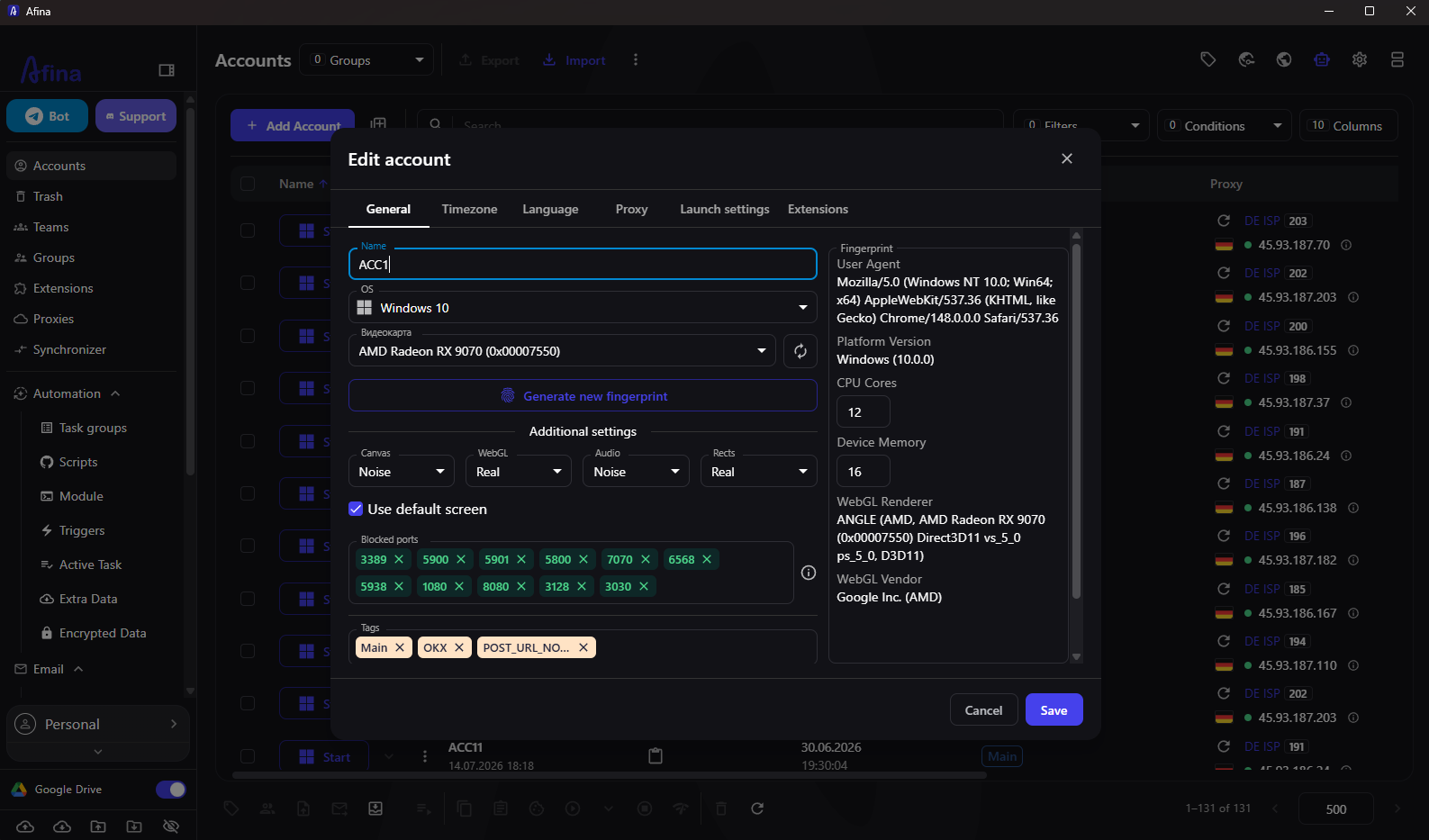
When several accounts run in a regular browser, it is harder to keep storage, IP, WebRTC, language, timezone and other environment signals independent. In Afina, a profile works separately: a script runs inside the selected profile and uses its network and browser settings. This becomes especially visible in routine workflows where you need to repeat the process without mixing accounts together.
In practice, it looks like this:
1. create a profile for a specific account or project
2. connect a separate proxy at the profile level
3. configure language, timezone, digital fingerprint and startup pages
4. save cookies or import an existing session
5. launch manual work, a script, a task group or an API command
6. check the result in logs and adjust limits if needed
For a team, this matters more than a one-off parameter change. An account should open in a predictable environment. Otherwise, inconsistent environment signals may increase the risk of extra checks or session linking by the platform.
Why scripts and task groups are useful
Scripts help when manual work gets in the way. An operator opens dozens of profiles every day, visits the same URLs, waits for elements, enters data and moves statuses into a spreadsheet. Sooner or later, they make a mistake. That kind of process is better described as a scenario or connected through the [local Afina API](https://afina.io/en/blog/afina-api?utm_source=binom).
In Afina, a script is built as a chain of actions: open a tab, visit a website, wait for an element, click, enter text, run JavaScript, write a variable or send a notification. Scenario stability depends on properly configured delays, XPath or CSS Selector waits and error handling. Without that, the scenario becomes fragile. The page loads one second later, the element does not appear and the task fails.
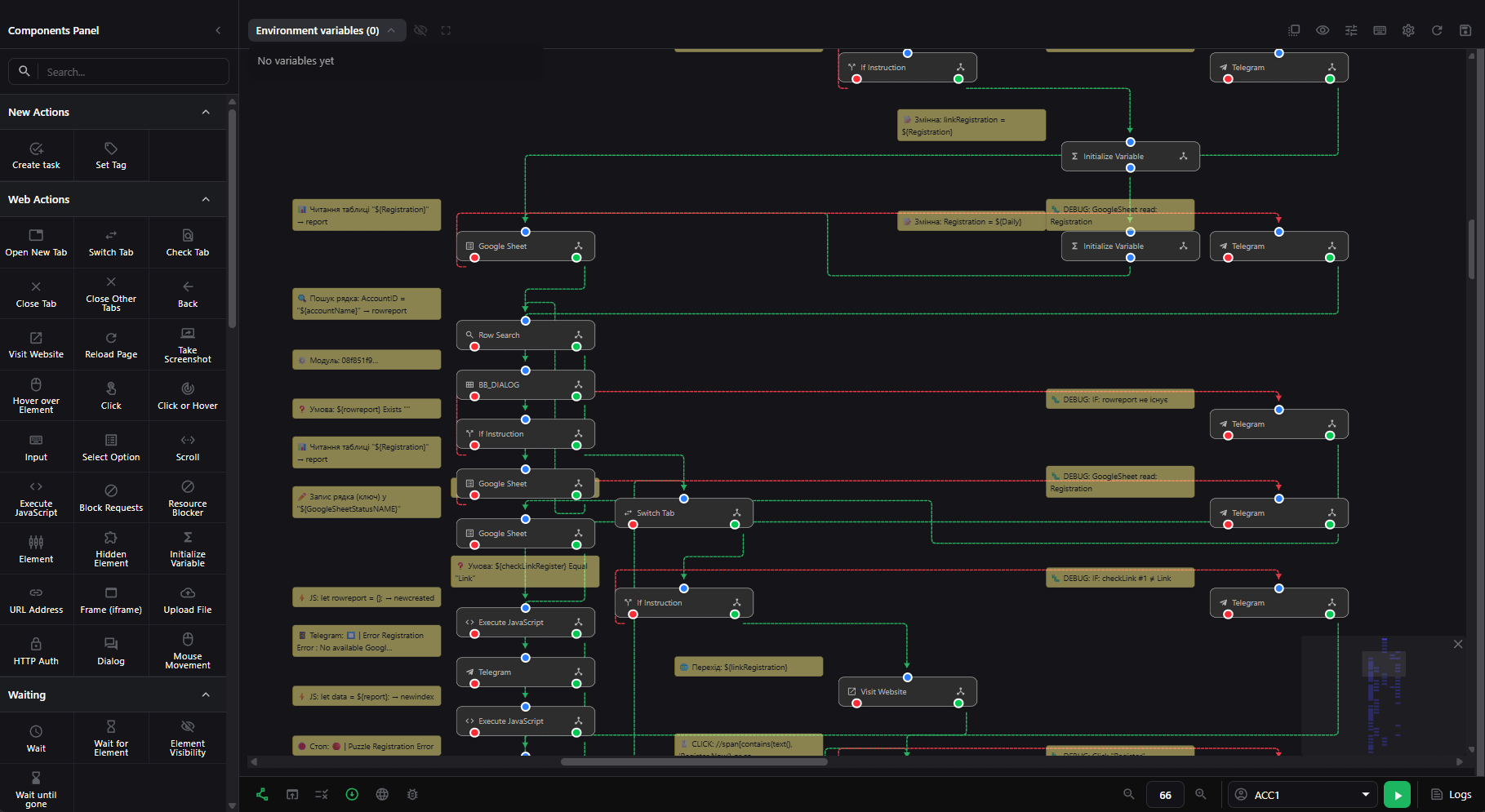
Task groups are useful when scenarios need to run in batches instead of launching the whole pool at once. This makes it easier to warm up profiles, check account statuses, update data, run a series of logins or process similar dashboards. Usually, the team sets a queue, concurrency limit, timeout, retries and priority. For warm-up and other repeated actions, the scenario should also respect the rules and limits of the target platform.
A typical script workflow looks like this:
1. describe the process as a sequence of short actions
2. prepare profiles, proxies and account-specific data
3. build the scenario from blocks or use existing logic
4. add element waits and delays between actions
5. test the script on one profile
6. run the scenario on a group of profiles with a concurrency limit
7. check logs, errors and final status
This approach does not change the rules or limits of external platforms. It reduces manual repetition and gives the team control over the task queue.
How does the Afina API help manage profiles
The API is needed when the browser has to fit into an existing workflow. A CRM, tracker, spreadsheet, internal bot or analytics service may already know which account to open, which proxy to assign and which scenario to run.
The local Afina API works over HTTP at
127.0.0.1:50778 and allows teams to manage profiles, proxies, cookies, scripts and tasks. Authorization uses an API key. When a profile starts, it can return a CDP WebSocket for connecting Puppeteer or Playwright, which makes it possible to use controlled CDP integration instead of simulating clicks in the interface.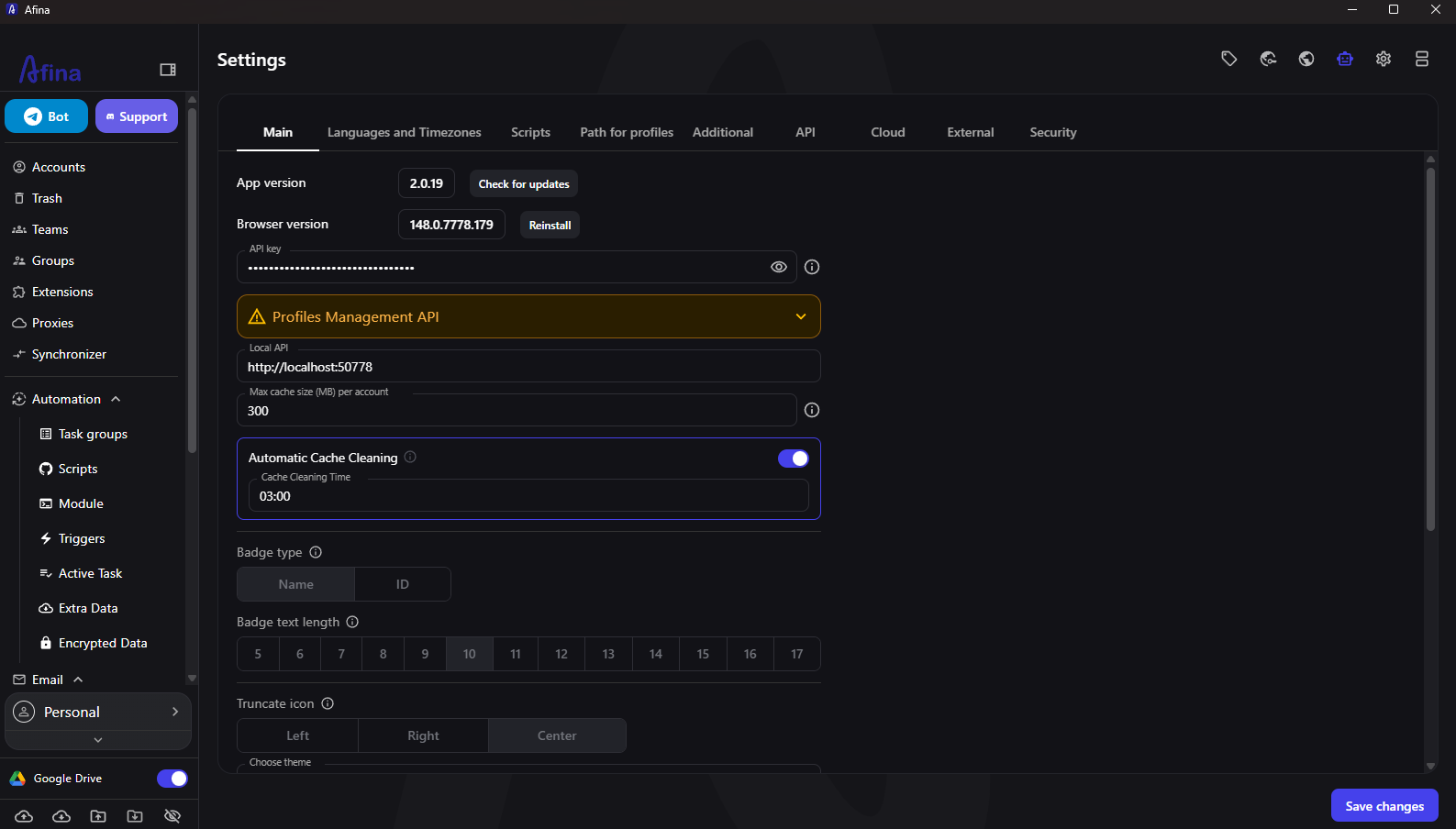
A practical API scenario may look like this:
1. get the profile list through
/api/profiles/list2. select a profile by tag, group or ID
3. update profile settings or assign a proxy
4. start the profile through
/api/profiles/start5. get the
wsEndpoint for CDP connection6. perform an action through Playwright, Puppeteer or an RPA script
7. stop the profile and save cookies
8. write the result to an external system
The API works well for processes with lots of data and little reason to do things manually: bulk profile creation, proxy checks, scheduled scenario launches, cookie export, screenshots, variables and statuses. But the base rule stays the same. Automation inherits the profile environment, so the proxy, digital fingerprint and session still need to be checked.
How is the Synchronizer different from scripts and API
The Synchronizer is useful in middle-ground cases. The process is still better controlled by hand, but actions need to be repeated across several profiles at once. Scripts fit predefined logic, the API fits integrations and the Synchronizer covers manual operations: a person works in the master window, while selected profiles repeat clicks, input, navigation and scrolling.
Afina Synchronizer does not copy the account identity. Each profile remains a separate browser with its own digital fingerprint, cookies, localStorage and proxy, while only actions are synchronized. This is useful for quick checks, similar interface tasks, page reviews and operations where writing a separate scenario takes longer than doing the task once.
Comparison of approaches:
| Approach | When to use it | What to control |
|—|—|—|
| Scripts | A repeatable process with clear steps | XPath, delays, conditions, logs |
| API | Integration with an external system or code | API key, profile IDs, API responses |
| Synchronizer | A manual task across a group of profiles | Master window choice, window limit, RAM load |
| Manual work | A one-off check or an unusual case | Proxy, session, avoiding unnecessary actions |
If a task repeats every day, it is better to move it into a script or API flow. If it appears occasionally and needs a human decision, the Synchronizer saves time without adding unnecessary engineering.
How to prepare a profile before automation
Before automation starts, the profile has to be technically consistent. A mistake here is often more expensive than a script error: the wrong IP, country, timezone or WebRTC signal can break environment consistency even when the action logic is careful.
Minimum profile preparation:
1. create or open a profile in Accounts
2. check the digital fingerprint: User Agent, WebGL, Canvas, Audio, CPU, memory and screen
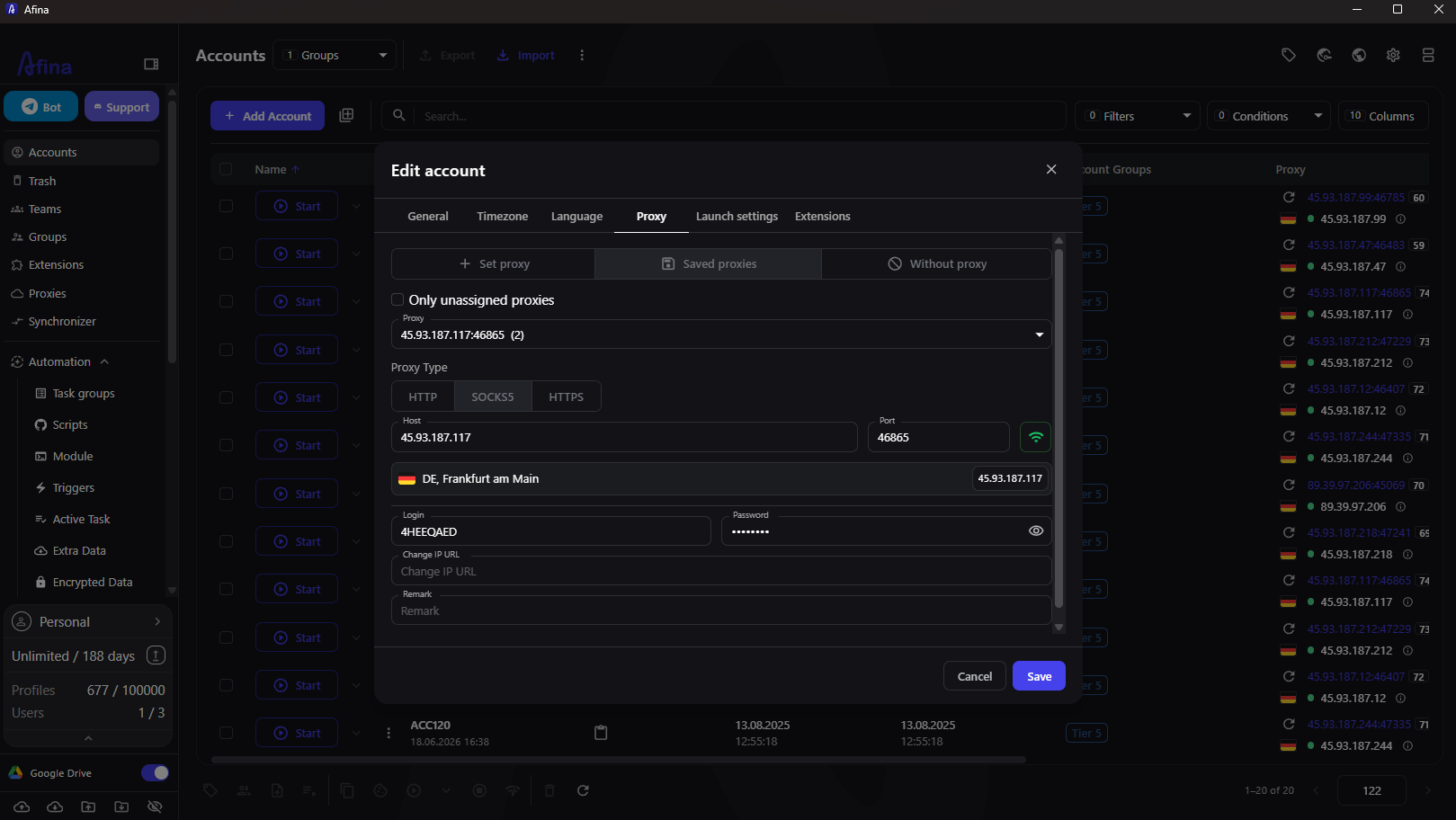
3. assign a proxy in the Proxy tab
4. verify country, city, ASN and support for the required protocol
5. set timezone and language according to proxy geo
6. import cookies if an existing login is needed
7. add tags, a group and account service data
8. launch the profile and check IP, WebRTC and language inside the browser window
After this check, it is better to launch the scenario on a small group first. If errors repeat in the same places, the logic needs fixing, not the whole profile pool.
For scaling, a simple mapping table helps: profile, account, proxy, geo, cookie status, scenario, last launch date and error note. This table lets automation rely on a clear infrastructure map rather than an operator’s memory.
What risks and limits should be considered
Automation reduces manual load, but it does not cancel platform rules, action limits or anti-fraud checks. Most problems come not from the tool itself, but from an aggressive scenario: too many identical actions, sharp transitions, no pauses, repeated input, weak proxies or mismatched geo.
Before scaling, check:
1. whether all profiles are launching at the same time with identical behavior
2. whether scripts have delays and element waits
3. whether one IP is used for accounts that should not be linked
4. whether language, timezone and proxy geo match
5. whether WebRTC exposes the real IP
6. whether task groups have concurrency limits
7. whether the team knows what to do on an error, captcha or missing element
An antidetect browser helps assemble the working environment, but it cannot guarantee how external websites will react. A reliable setup starts small: a few profiles, a test run, log review and then gradual load growth. This material is provided for informational and educational purposes only.
Promo codes for new users:
– **SALE20** – 20% off Base, Standard and Max plans
FAQ
What is an antidetect browser with automation?
An antidetect browser with automation is an environment where isolated profiles, proxies, cookies and scenarios help manage multiple accounts without constant manual routine.
Why does an antidetect browser need an API?
An API is needed to start and stop profiles, assign proxies, work with cookies, scripts and tasks from external code, a bot, spreadsheet or internal system. If needed, the profile can be connected to Playwright or Puppeteer through a CDP WebSocket.
How are scripts different from the Synchronizer?
Scripts execute predefined logic, while the Synchronizer repeats manual actions from the master window across several isolated profiles at once.
Can Playwright or Puppeteer be connected to Afina?
Yes, an Afina profile can be launched through the API and connected to Playwright or Puppeteer through a CDP WebSocket when the workflow requires code-based automation.
What actions can be automated in an antidetect browser?
Teams usually automate logins, status checks, form filling, navigation, warm-up, cookie work, repeated clicks and task launches across profile groups.
What mistakes most often break automation?
The most common issues are a wrong XPath, missing waits, pauses that are too short, weak proxies, a mismatched timezone and launching too many profiles at once.