Tired of networks where half your budget feeds bots and support replies once a week? Meet EpicAds.Net — a young but sharp UK-registered ad network that bet everything on what actually converts: three top formats — Push, In-Page and OnClick (Pop), all on CPC. No fluff, just the formats media buyers have been profiting on for years.
This review covers not only why people love the network, but a step-by-step walkthrough of building your first campaign, how to squeeze the most out of the built-in Epic Spy tool, and how to wire it all into the Binom tracker.
Volumes that make your eyes pop
The scale is no gimmick: around 14.7 billion impressions and 27 million clicks a day across 255 countries, with the fattest inventory in Tier-2 and Tier-3 — India (≈41M clicks), Indonesia (≈10M), Brazil (≈6M), plus Bangladesh and Mexico. If you run dating, nutra or gambling on emerging geos, this is where cheap clicks meet real traffic instead of empty impressions.
The formats under the hood:
- Push — notifications straight to the user’s device, even when they’re off-site. Big volume, low cost, high CR.
- In-Page — push-style messages with an image right on the page. Works on all devices and browsers, including iOS, where classic push isn’t supported. High CTR.
- OnClick (Pop) — ads in a new tab on click. Huge volume, dirt-cheap clicks, perfect for testing and scaling. Frequency capping keeps you from burning the audience.
One dashboard, two roles
The killer feature everyone appreciates: advertiser and publisher live in a single account and switch roles with one button in the top-left corner — no second signup. Buy traffic and monetize your own sites from the same window.
Verticals — basically everything that prints money: dating, nutra, betting, gambling, crypto, adult, sweepstakes, finance, apps. Only the real junk is banned (weapons, drugs, malware, violence) plus anything illegal.
How to build your first campaign: step-by-step
Step 0. Register (1 minute)
Hit “Join now,” fill in name, email, password and Telegram (Skype optional). No email verification — the dashboard opens instantly. If you already signed up as an advertiser, a webmaster account is created automatically.
Step 1. Fund your account
Go to Funds → pick a method: USDT TRC-20, Capitalist USD or PayPal (Visa/Mastercard coming soon). Minimum deposit is $50. The same section has a promo code field — don’t forget it if you grabbed a top-up bonus. After the crypto transaction confirms, funds land almost instantly.
Step 2. Recon with “Volumes of Traffic”
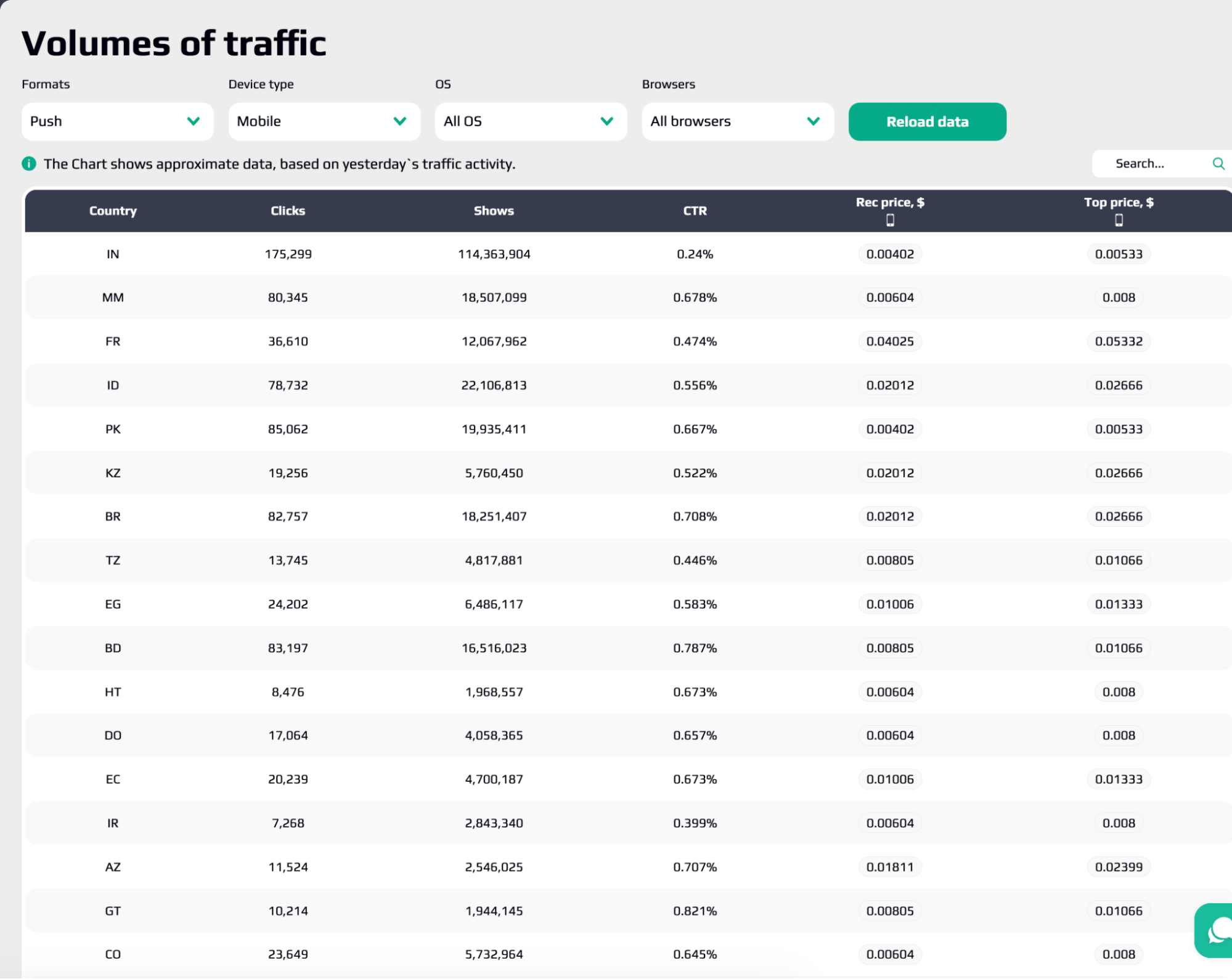
Don’t buy blind. Open Volumes of Traffic for yesterday’s data broken down by geo, format, device, OS and browser. For each segment you’ll see:
- available clicks and shows;
- CTR;
- recommended CPC;
- maximum CPC.
⚠️ Important: bidding below the recommended CPC = little or no traffic. Read the numbers first, then set your bid.
Step 3. Connect your Binom
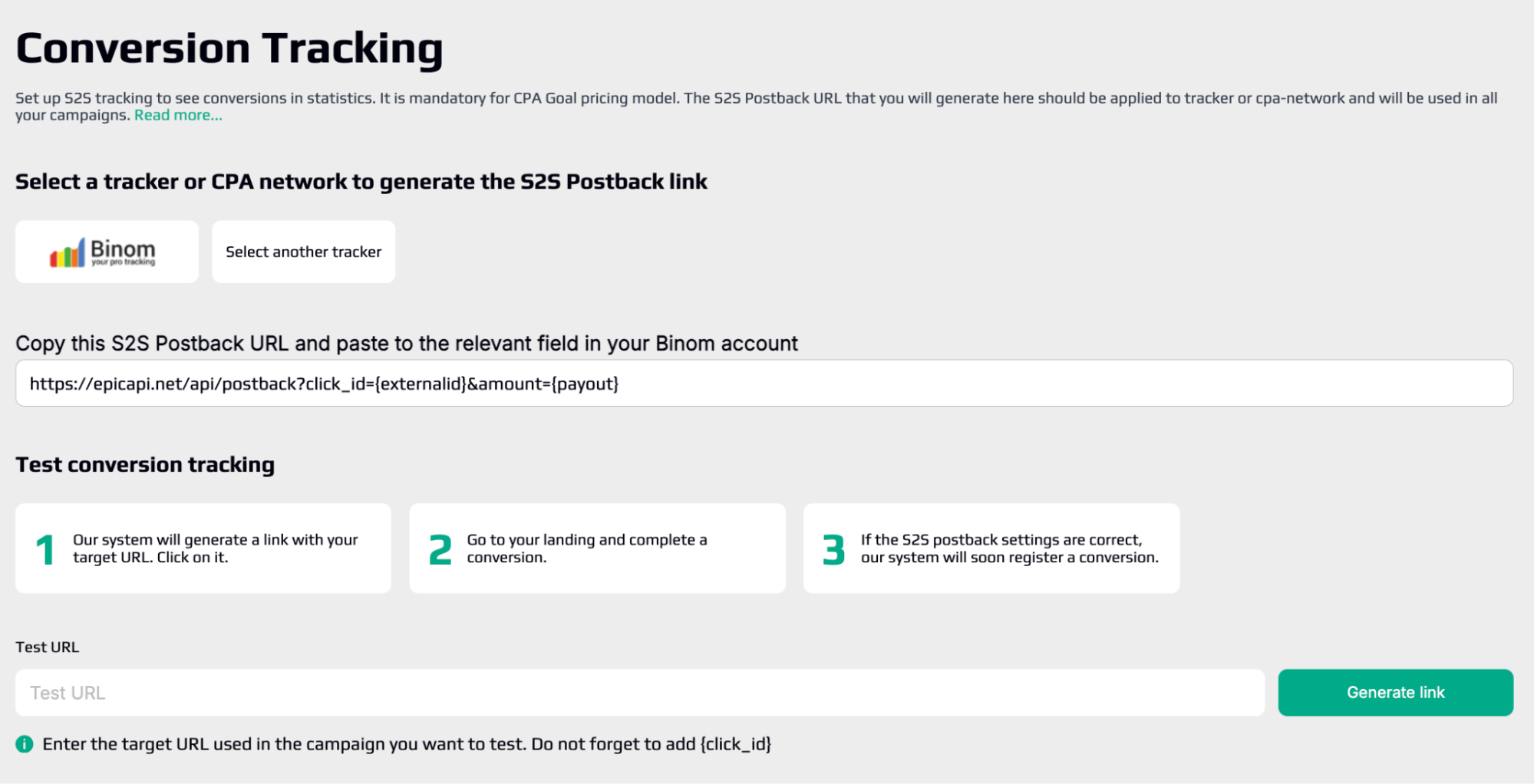
Head to Tracking / Conversion Tracking. There are ready-made templates for Binom, Voluum, AdsBridge, PeerClick and more. The flow:
- Pick your tracker from the list (or “another tracking/CPA network” for manual setup).
- Copy the generated postback URL.
- Paste it into your tracker’s postback config.
- Pass the right macros (see table) so data flows between systems.
- Run a test conversion: click the link → complete a conversion on the LP → check stats a couple minutes later.
Handy EpicAds macros:
| Macro | What it passes |
| {click_id} | unique click ID (needed for conversions) |
| {source_id} | publisher site ID |
| {zone_id} | exact placement |
| {cost} | actual click cost (for ROI) |
| {country} / {city} | user geo and city |
| {campaign_id} | links to the campaign |
| {creative_id} | which creative fired |
| {format} | Push / InPage / OnClick |
| {os} / {os_version} | OS and version |
| {browser} / {browser_version} | browser and version |
| {connection_type} | mobile / WiFi |
| {lang} | browser language |
Step 4. Create the campaign
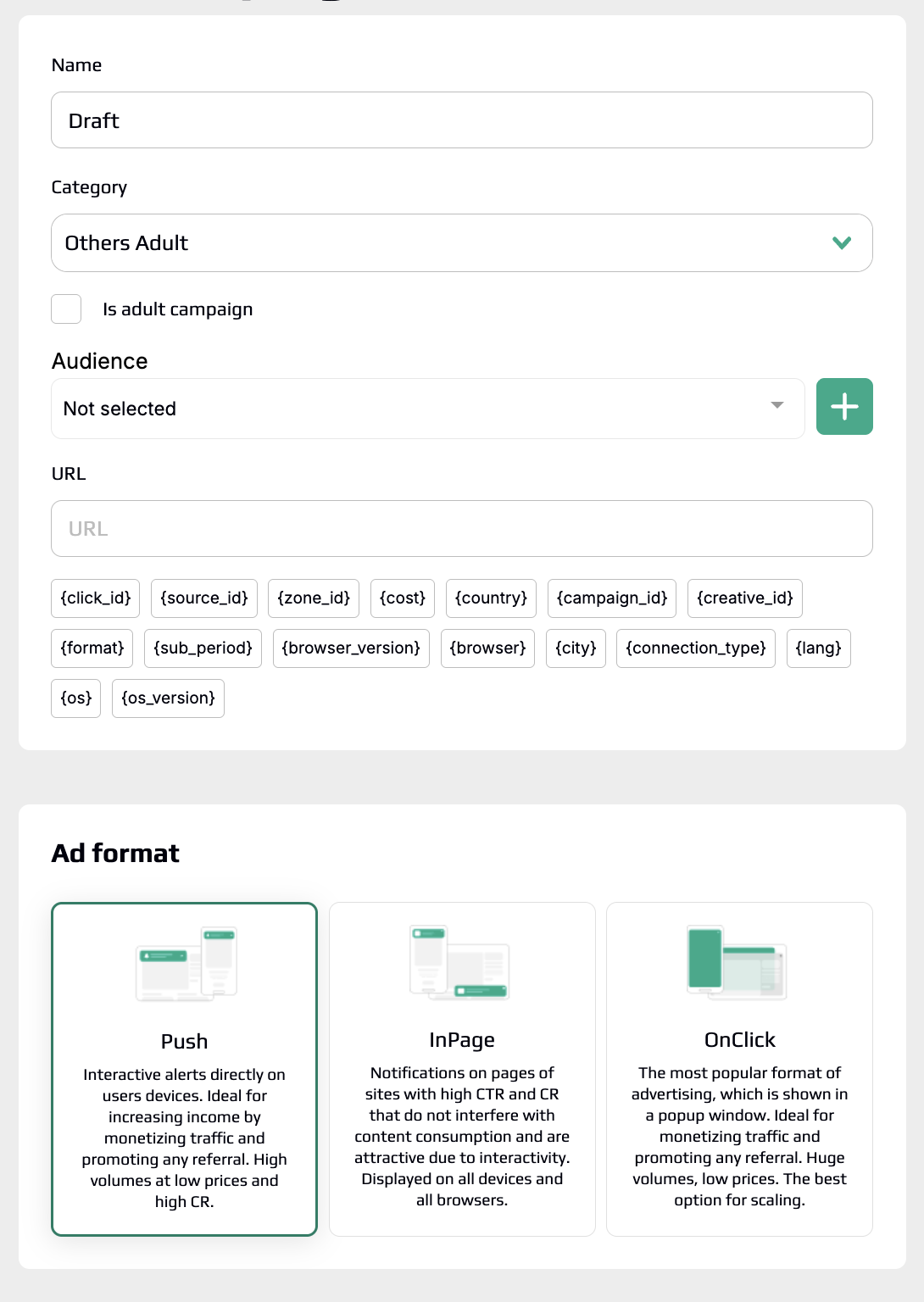
Campaigns → Create Campaign (+). Stage by stage:
- Basic info — name (make it descriptive), category/vertical (doesn’t affect traffic, just for reference), audience (“Not selected” for now), URL of your LP/offer with tracking params.
- Format — Push, In-Page or OnClick. Newcomers usually start easiest with Push.
- Geo + bid — pick countries and set a bid per country (start at the recommended CPC from recon).
- Filters and schedule — device, OS, OS version, browser, version, language; optional dayparting by hour/day. The platform runs on UTC+3 — mind the timezone. Daily limit is $10 minimum, or set a total budget.
- Creatives (for Push/In-Page). You can load multiple creatives per campaign for split-testing.
Push/In-Page creative requirements:
| Element | Limit / size |
| Badge | from the provided set |
| Title | up to 30 characters |
| Description | up to 40 characters |
| Icon | 192×192 px |
| Large image | optional, 492×382 px |
After saving, the creative goes to moderation — usually within 30 minutes during business hours. Tick “Launch after moderation” to start the moment it’s approved. Preview via the eye icon: Android (solo/group), Windows (7/8/10), macOS and In-Page.
Step 5. Launch and optimize
The first 24–48 hours are critical. Live in the Statistics section and group your data:
- by date/hour — catch peak conversion hours;
- by country — compare geos;
- by source — judge publisher quality;
- by format / device / OS / browser — the technical picture.
Everything exports to CSV with customizable columns.
Step 6. Audiences (black/white lists) + microbidding
The Audiences section is your main optimization lever. Build lists on three parameters:
- Source ID — cut sources that burn budget, or whitelist your top performers;
- IP — filter suspicious traffic or specific ranges;
- Subscription ID — work push subscribers precisely (retarget/exclude).
💡 Pro tip: don’t mix black and white in a single audience — you’ll create conflicting rules and choke your traffic. Make separate audiences and name them clearly.
Add microbidding — raise bids on converting sources and trim the dead ones without touching the whole campaign.
Epic Spy: a free spy tool right in your dashboard
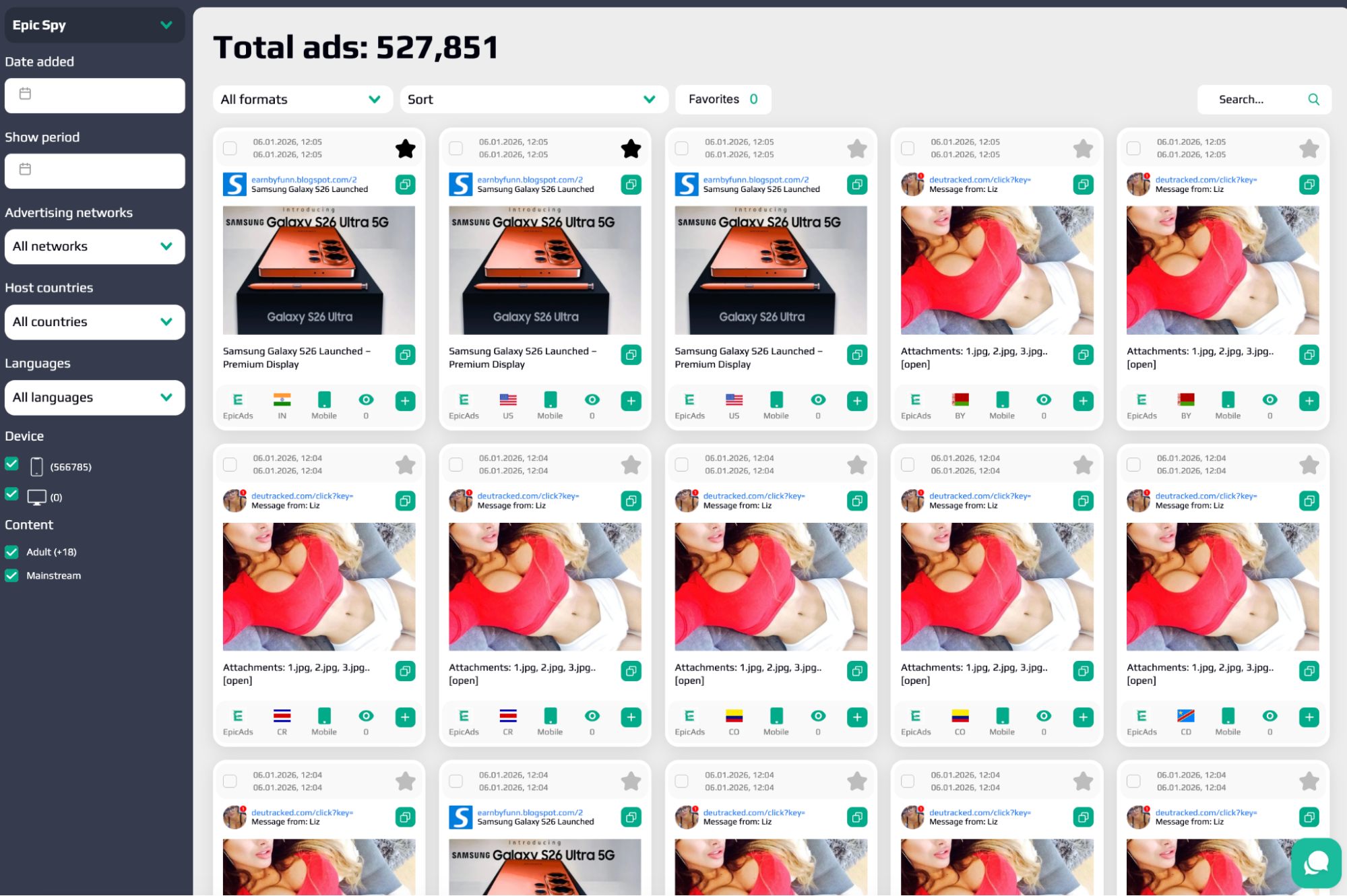
A real treat in EpicAds is the built-in Epic Spy service, available immediately after registration and for free. While competitors pay for third-party spy tools, here a database of live push and in-page creatives sits right at hand.
What’s inside
- A database of creatives actually running in the network (EpicAds and Push.House).
- Rich filters: date added, show period, ad networks, geos, languages, device, content type, format and keyword search.
- Sorting: newest/oldest, by number of shows (more/fewer).
How to use it (step by step)
- Open Epic Spy in the main menu.
- Filter to your vertical and geo.
- Found a solid creative? You’ve got several actions:
- ⭐ add to Favorites;
- copy the title;
- open the image in a new tab and download it;
- copy the description;
- hit “+”, pick a campaign from the dropdown and import the creative straight into the campaign in one click.
- After import the creative shows up in the campaign’s ad list — just wait for moderation.
What to study in competitors’ creatives
- attention-grabbing images;
- headline formulations that spark curiosity;
- the CTA approach;
- overall angle and messaging.
Honest about Epic Spy’s downsides
- Impression counts show 0 for every creative — you can’t yet tell which ad actually performs by volume.
- Some functions are still being polished (the tool updates frequently).
- ⚠️ All your own ads are auto-added to Epic Spy and visible to other buyers — there’s no way to hide your creatives. If you’ve got a unique combo, keep that in mind.
Even so, as a cure for creative block and a source of ideas, Epic Spy saves a ton of time.
Money: cheap to enter, fast to cash out
- Deposit/withdrawal — from $50.
- Cashout: USDT TRC-20, Capitalist USD, PayPal (cards coming soon).
- Publisher payouts — weekly (first payout has a 7-day hold).
- Fill rate — claimed up to 99.9% on premium inventory.
- Referral — lifetime 5% of a referred advertiser’s spend and 5% of a referred publisher’s earnings. Bring people in and collect passive income.
Can you trust it?
Yes. Scamadviser flags the domain as trustworthy, Trustpilot sits around 4.8/5, backed by 24/7 support and a personal manager (Telegram, email support@epicads.net) who’ll actually help you launch your first campaign. Soft landing for newbies, full control for pros.
Honest cons: the network is young, the format lineup is narrow (no native/video/banners), there are no automated optimization rules, and Epic Spy still lacks impression data. For push/pop on Tier-2/3, those are nitpicks.
EpicAds + Binom bundle
- In EpicAds Tracking, pick the Binom template and copy the postback.
- In Binom, create an EpicAds traffic-source campaign and pass the macros ({click_id}, {cost}, {source_id}, {country}, {creative_id}…).
- Set up the postback/pixel on the affiliate-network side so conversions land in both Binom and EpicAds.
- Run traffic, watch in Binom which creatives and sources actually bring leads, cut the junk with audiences and microbidding, and scale the winners.
Verdict
EpicAds.Net is a clean, fast, profit-focused push/pop traffic source with a Tier-2/Tier-3 edge. Cheap start, free Epic Spy, sane moderation, fast payouts and live support. If you’ve got dating, nutra, gambling or sweeps to run and want to turn green — grab a small test budget and launch a campaign today.
👉 Sign up on EpicAds.Net, run it through Binom, and scale whatever converts.